
Florida License Guide
Details from the FL Licensing Board available here.
Overview
Status: Red
Application Format: Online portal
Apply Here: Florida MQA Services Portal
How to Check Status: MQA License Verification
Special Note: You don’t need a Florida license to see patients in Florida — you only need to register as an out-of-state telehealth provider.
Special Note: Nourish provides the registered agent required for the application:
TELOS Legal Corp
155 Office Plaza Drive
Tallahassee, FL 32301
Quick Facts:
Initial License Fee is currently $165
License Renewal required every 2 years on May 31st of odd years.
Renewal License Fee is currently $100.
Initial Licensing Requirements
Application and Fees
To apply for a new license, submit a completed application along with the fee of $165.
You must also submit with your application:
Proof of a current, valid Commission on Dietetic Registration (CDR).
If applicable, verification of all licenses or certifications held, current or expired, from each state in which the applicant is or was licensed as a dietitian/nutritionist. Please see details at this link under MOBILE Endorsement.
License Renewal Requirements
Details from the FL Licensing Board available here.
Dietitian certifications expire on May 31st of odd years.
Fee: $100
Renew Online
If renewing late, please review your fees here.
Continuing Education Requirements
Details from the FL Licensing Board available here.
Total Required: 30 hours per 2 year period.
CE Requirements for First Time Renewal
Dietitian’s and Nutritionist’s renewing a license for the first time who were licensed in the second year of the 2 year renewal period are exempt from the continuing education requirements, but they are required to complete 2 hours of medical error and 3 HIV/AIDS.
CE Tracking
The Department of Health, Division of Medical Quality Assurance, will now review your continuing education records in the electronic tracking system at the time of renewal. It will happen automatically when you renew your license, but it is important that you understand how this simple change will affect the way you renew your license in the future. You can view details & register for you CEU tracking account here.
If the practitioner’s continuing education records are complete, they will be able to renew their license without interruption.
If the practitioner’s continuing education records are not complete, they will be prompted to enter their remaining continuing education hours before proceeding with their license renewal.
Important Contact Information
For more information:
If you have additional questions about your renewal process, please contact a renewal specialist.
Online Chat: https://www.floridahealth.gov/licensing-and-regulation/dietetic-nutrition/contact-info.html
Application Instructions
Log in to the Florida MQA Online Services Portal.
• Create an account if you don’t already have one.
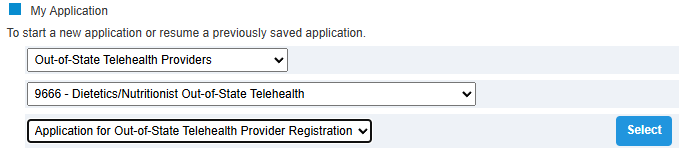
From your dashboard, start a new application:
• Board/Council: Out-of-State Telehealth Providers
• Profession: 9666 – Dietetics/Nutritionist Out-of-State Telehealth
• Application: Application for Out-of-State Telehealth Provider Registration
Enter your personal, contact, license, education, and CDR information as requested. Select “No” for discipline history.
Financial Responsibility
• Select Option A. Liability $100,000/$300,000
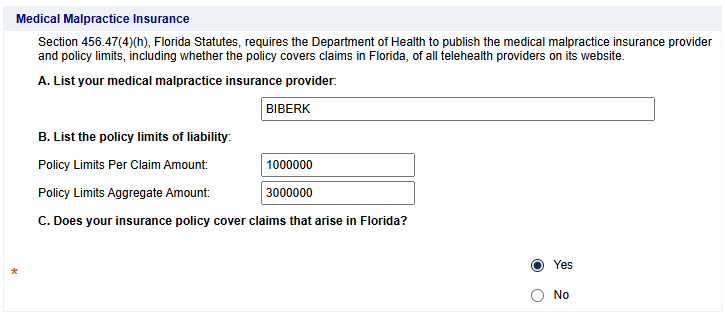
Medical Malpractice Insurance (Nourish Group Policy)
• Provider: LOCKTON
• Policy Limits Per Claim: 1,000,000
• Policy Limits Aggregate: 3,000,000
• Coverage in Florida: Yes
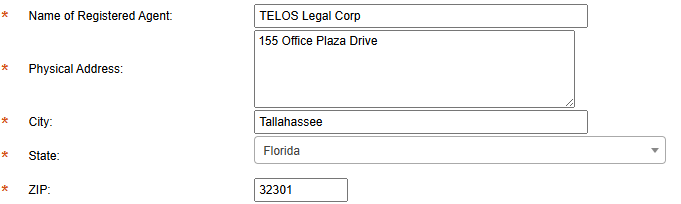
Registered Agent
• Name: TELOS Legal Corp
• Address: 155 Office Plaza Drive
• City: Tallahassee
• State: Florida
• ZIP: 32301
You do not need to upload attachments.
Review your application, confirm accuracy, and submit.
Resources & Links
Once Approved
Upload license to your Nourish Provider Portal → as soon as you upload, you’ll be turned on for Florida patients
Please use CDR expiration date as the license expiration date.
Take a screenshot of your license verification on THIS SITE to upload to Nourish Provider Portal.
Add license to CAQH under Professional IDs
License Issued
When you receive notice that your license is approved, please update your new license to the Nourish Provider Portal.